Runway performance.
Enter your conditions. Read both distances in feet.
Flight conditions
01Your distances
CHART ESTIMATEYour original charts.
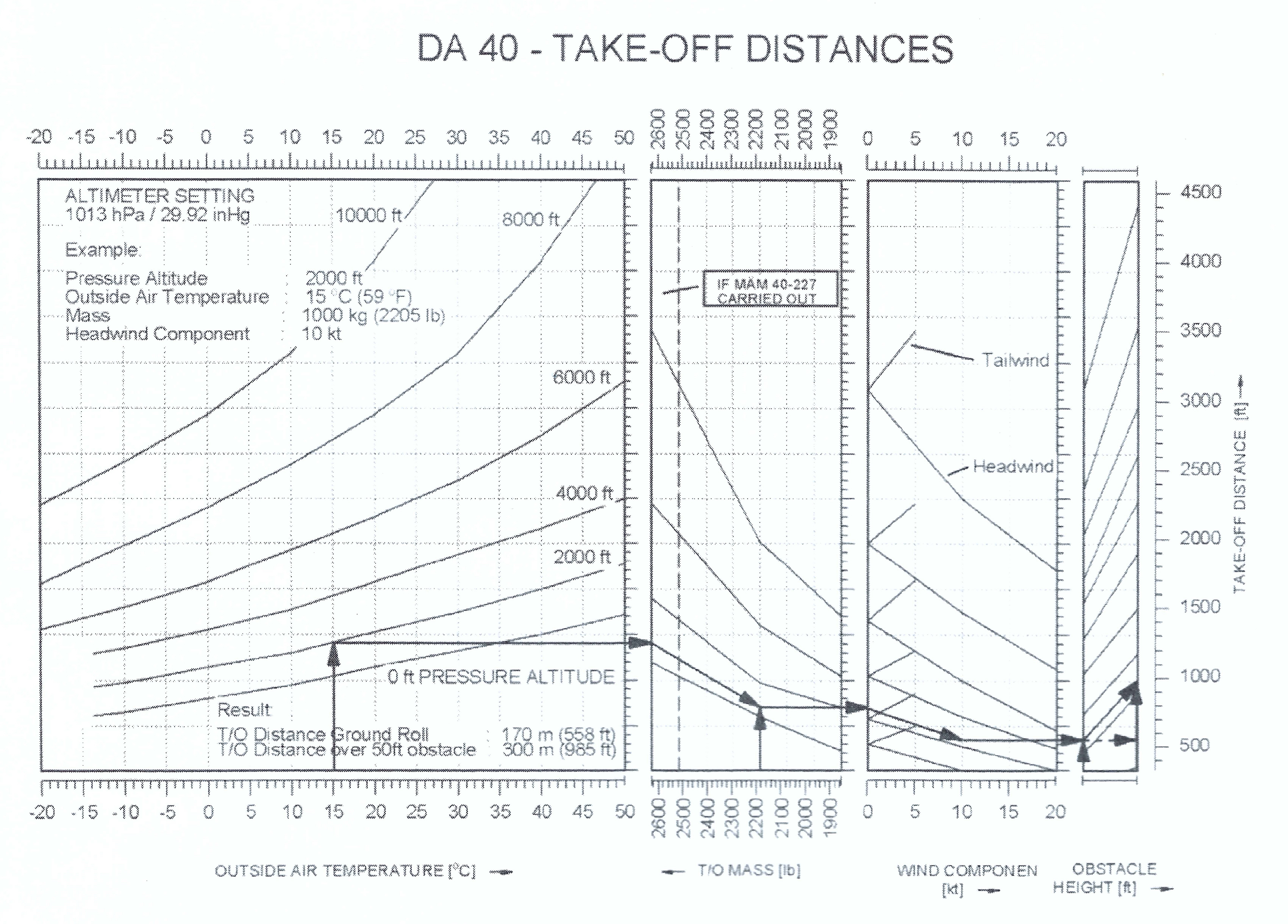
The highlighted path shows how your inputs move through the chart.
How the calculation reads these charts
Automatic pressure altitude
The reported altimeter setting (QNH) in inHg gives a standard-atmosphere pressure correction, which is added to the aerodrome elevation in feet. This follows the conversion-factor method in the FAA pressure-altitude chart. For example, 730 ft at 30.22 inHg gives a correction of about −275 ft and a pressure altitude of approximately 455 ft.
The continuous correction uses standard pressure of 1013.25 hPa (29.92126 inHg). Pressure altitude is displayed to the nearest foot; both performance charts use the unrounded estimate. Temperature is applied separately. A calculated altitude outside 0–10,000 ft is shown but cannot be used for these charts.
CX-3 wind components
Runway heading = runway number × 10°. With θ = magnetic wind direction minus runway heading, headwind = wind speed × cos(θ), and crosswind = wind speed × sin(θ). A negative headwind is a tailwind. A negative crosswind comes from the left; a positive one comes from the right.
This follows the runway and sign conventions in the CX-3 user’s guide, page 11, and matches its example: 350° at 10 kt on runway 03 gives −6.43 kt crosswind and 7.66 kt headwind. Components are displayed to two decimals; the distance charts use the unrounded headwind. Convert true wind directions to magnetic before entry. The component calculation can show tailwinds and headwinds above 20 kt, but those conditions are outside this combined distance calculator.
One fixed source
Only the two uploaded chart images supply the performance data. No other aircraft model, live data, or replacement tables are used. Ground roll is the 0 ft reading; obstacle distance is the 50 ft reading.
A graphical estimate
The curves were sampled by hand. The calculator interpolates between pressure-altitude lines, then follows weight, headwind, and obstacle guide curves. Between sampled points, it uses straight-line interpolation.
Limits stay visible
Altitude: 0–10,000 ft. Weight: 1,900–2,600 lb. Headwind: 0–20 kt. Temperature limits depend on the visible altitude curves. Readings outside the chart panels are blocked. Within a panel, a reading beyond the sampled guide band follows the nearest guide in parallel and is flagged as less certain.
Keep the chart context
The source includes a MAM 40-227 note near 2,535 lb. A weight appearing on the axis does not establish an aircraft operating limit. The images do not establish every aircraft or runway assumption. No slope, surface, technique, or safety-margin corrections are added.
The printed example
2,000 ft · 15 °C · 2,205 lb · 10 kt headwind
Know where the numbers come from.
Weight and balance, takeoff, and landing information is sourced from Genesis Flight College’s documents and resources. Takeoff and landing estimates use the fixed charts supplied for this calculator.
The weight-and-balance calculator uses saved school aircraft sheets and amendments. Amendments are checked and updated manually by LAZYKAL’s owner; visitors cannot start checks, and opening the site does not contact the school. All visitors share the saved result, with the date shown as “Amendment checked”. Updates are applied after the owner checks the documents; if a changed document cannot be verified, the affected calculation pauses. The amendment used is shown beside each aircraft.
Use at your own discretion. Verify all results against the aircraft’s current official documents before flight.